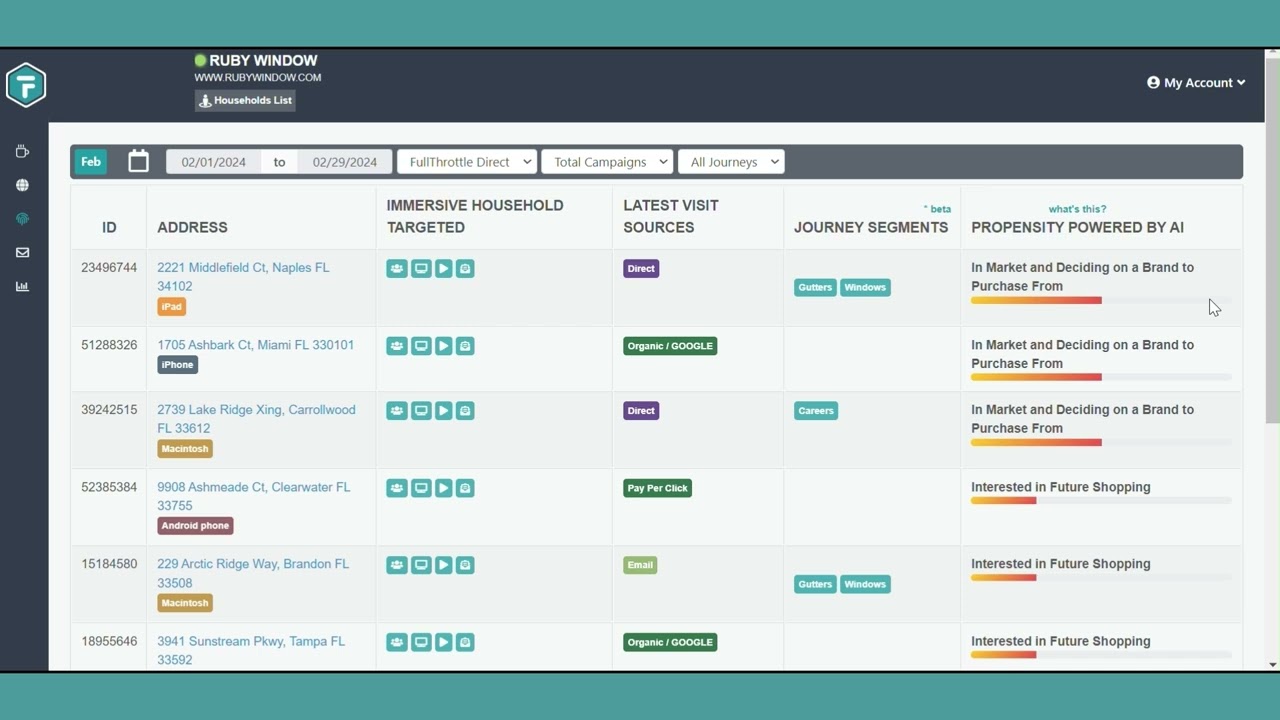
Most marketers know how many people visit their website, but now who those visitors are or what they’re interested in. In this walkthrough, you’ll learn how to navigate fullthrottle.ai’s identity tab within the platform to uncover household-level visitor insights, explore website journeys, and identify the households showing the strongest signs of intent.
See how to review household activity, including pages viewed, devices used, referral sources, and visitor journeys. You’ll also learn how to use filters for dates, campaigns, and journey segments, and see how fullthrottle.ai’s AI-powered propensity scoring helps surface households that may be actively in market.
Beyond individual records, the platform shows the bigger picture too. A map view reveals where your visitors live, so you can spot pockets of interest by area. A summary view rounds up the past month of activity, sorting visitors by how close they seem to buying and showing which products and pages draw the most attention. It also highlights the cities and zip codes most visitors come from, and that data can be downloaded to share or analyze elsewhere. Small icons on each record show which households your marketing has already reached, so you always know who has been contacted and who still needs a nudge.